Tool Evaluation
When your agent calls tools, Spectral evaluates every call. It checks whether the call was valid, whether it was the right tool at the right moment, whether the arguments were justified, whether the result was useful, and whether the agent's answer actually used what the tool returned.
Tool evaluation runs automatically whenever a tool-using agent is connected through the Responses API protocol. No extra configuration is required: if your agent makes tool calls, Spectral scores them.
Evaluate tool usage
Connect your agent
Create a target on the Responses API protocol so Spectral can capture tool calls. Optionally declare your tool catalog to enable schema-level argument checks.
Run an evaluation
Launch an evaluation against the target with the evaluation wizard, exactly as you would for any other system. There is no tool-specific setup.
Read the tool results
Open a completed execution and review each tool call in the Tools section. See Reading the results below.
Dimensions
Spectral scores each tool call across five dimensions, split into two groups by how they affect the result.
Blocking dimensions count as violations: a failure here flags the execution.
| Dimension | What it checks |
|---|---|
| Validity | The call is well-formed: the tool exists, the arguments parse, required parameters are present, and types, enums, and constraints match the tool's schema. Checked deterministically against the schema, with no model judgment. |
| Faithfulness | The agent's answer faithfully uses the tool result: it does not ignore it, contradict it, or invent details the result does not support. |
Validity compares arguments against each tool's JSON Schema, taken from the tool catalog you declare on the target or that Spectral discovers from your agent's responses. Without a schema, the other checks still run.
Informational dimensions surface as concerns. They are reported and contribute to warnings, but do not count as violations.
| Dimension | What it checks |
|---|---|
| Relevance | Calling this tool was the right choice at this point in the conversation, independent of the arguments. |
| Argument accuracy | The arguments passed were justified by what the conversation made visible at that point. Not scored when the call carries no meaningful arguments. |
| Output value | The result the tool returned provided useful information toward the user's need. |
Each flagged dimension carries a severity on the same Low / Medium / High / Critical scale used elsewhere.
Tool dimensions are evaluated per execution and shown in the execution detail. They do not yet factor into the aggregate readiness score, rankings, or PDF report. Those metrics currently reflect the conversation-level dimensions only.
Reading the results
Open an execution. When the agent made tool calls, a Tools section appears alongside the conversation.
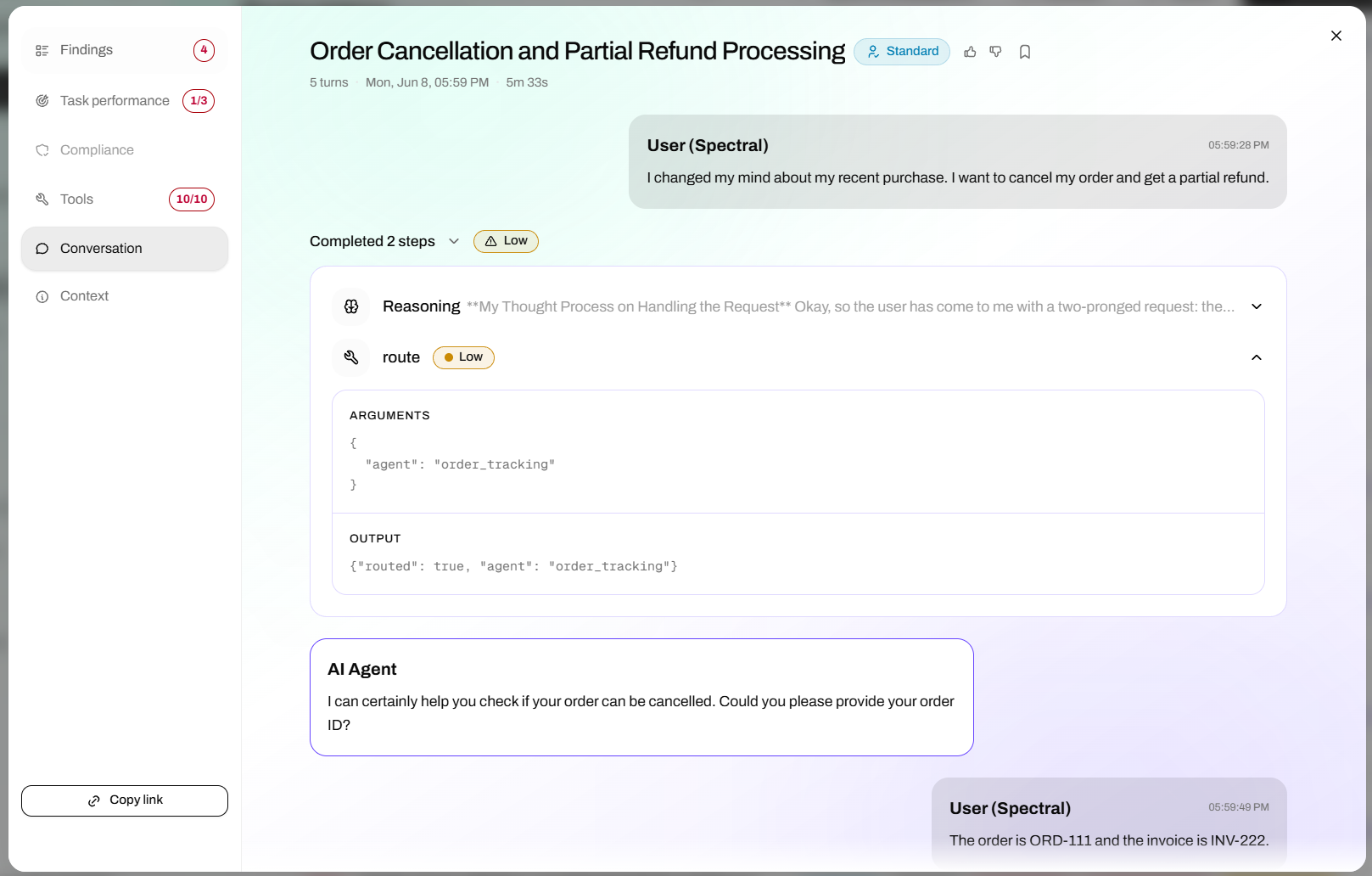
The conversation, with the agent's tool calls inline
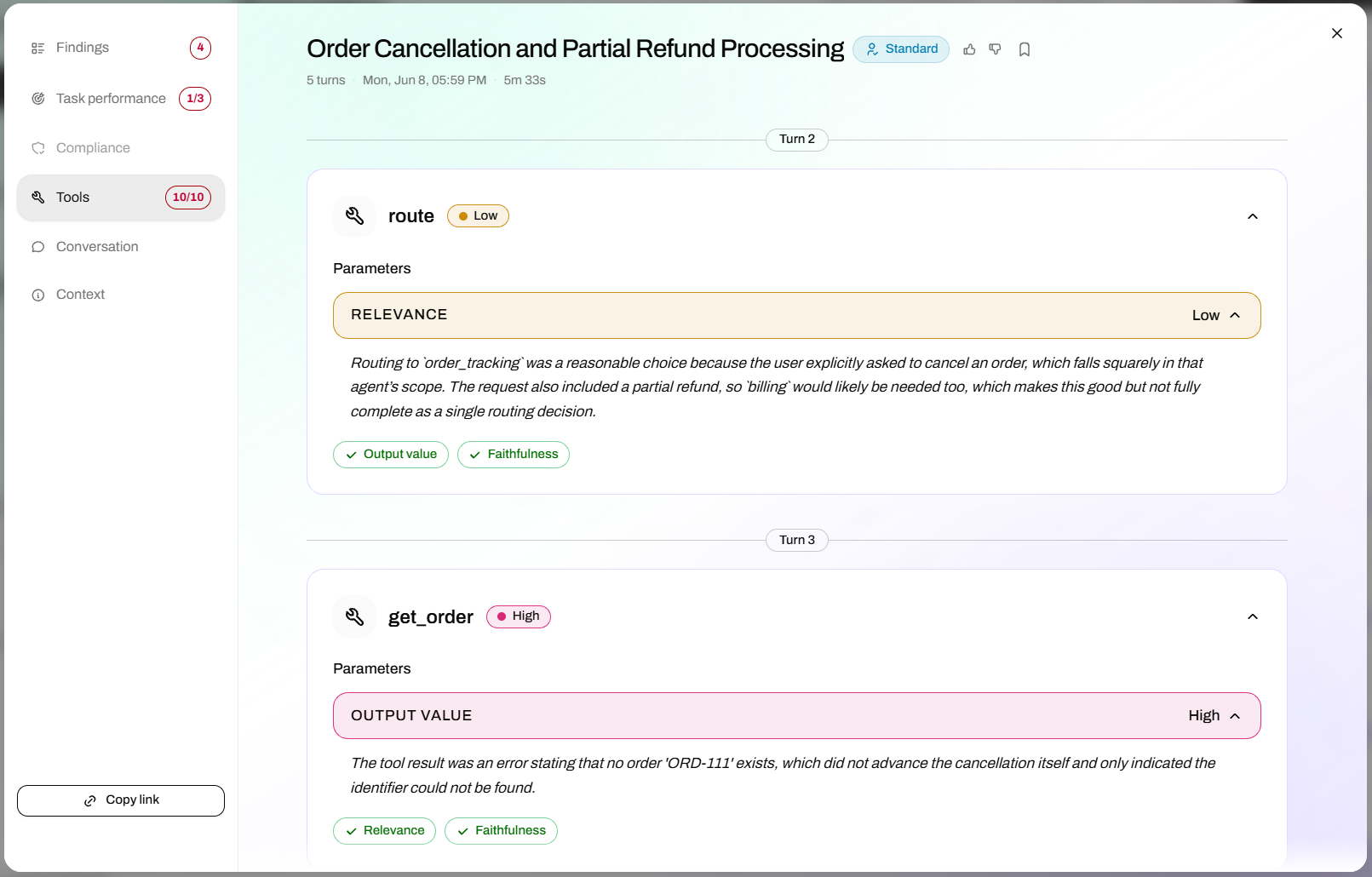
The Tools pane: each call scored across its dimensions
- Each tool call is listed under the turn it belongs to, with its tool name and a status pill summarizing the worst verdict across its dimensions.
- Failing dimensions are expanded by default, with the rationale for the verdict. Passing dimensions collapse into a single summary row.
- A "View in conversation" link jumps to the matching tool call in the conversation transcript.
In execution lists and the findings rollup, tool problems are grouped into two buckets: blocking issues (validity or faithfulness) appear with violations, and informational concerns (relevance, argument accuracy, output value) appear as a separate non-blocking badge such as Tool concerns. Both deep-link into the Tools section at the most severe call.
Per-tool supervision
The five dimensions above are a single, generic supervisor that applies to every tool call regardless of what the tool does. Per-tool supervision, where you define expectations specific to an individual tool, is coming. These five dimensions will remain as a baseline that any tool-specific supervisor builds on.