Create a Task
A task defines what a synthetic user is trying to accomplish. The description and supporting information determine how realistic and targeted the resulting scenarios will be.
Open the Create Task dialog
Navigate to Tasks in the sidebar, then click Add Task.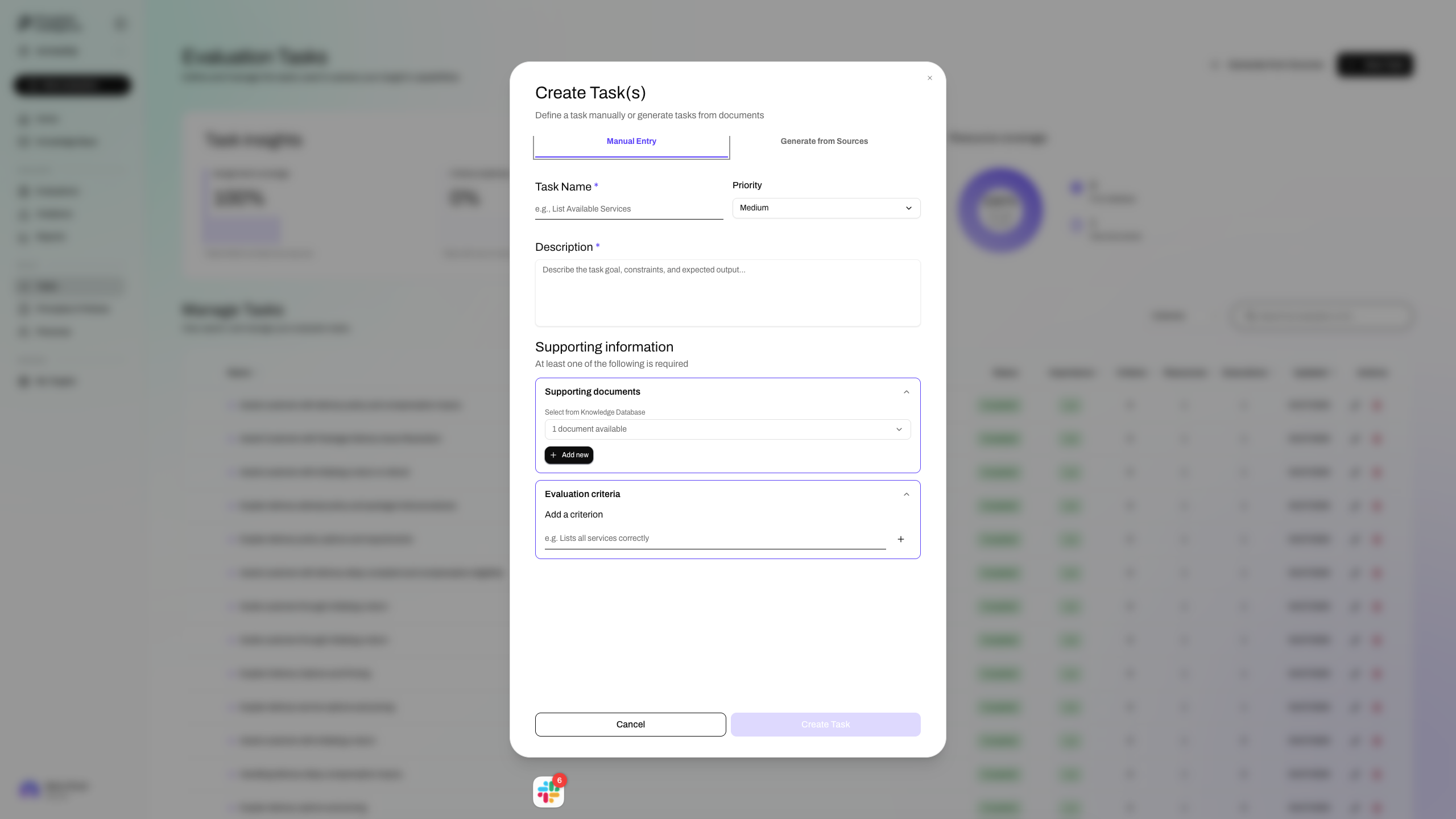
Task Name
Give the task a concise, action-oriented name that describes what the user is trying to accomplish, for example "List Available Services" or "Submit a Support Request".
Priority
Set the priority to control how much coverage this task receives across evaluations. Higher-priority tasks are weighted more heavily when Spectral selects which tasks to run.
Description
Describe the task goal, any constraints, and what a successful outcome looks like. Be specific: vague descriptions produce vague scenarios. Include the context in which a user would attempt this task and any edge cases your system should handle.
Supporting documents
Link the knowledge base documents relevant to this task. Spectral uses these to generate realistic scenarios and to evaluate whether responses are accurate relative to your ground truth.
Evaluation criteria
Add at least one criterion Spectral will use to judge whether the task was completed correctly. Each criterion should be a concrete, observable statement, for example "Lists all available services correctly" or "Does not suggest unavailable options".
At least one entry in Supporting documents or Evaluation criteria is required before you can save the task.